Best Label Maker UK 2026
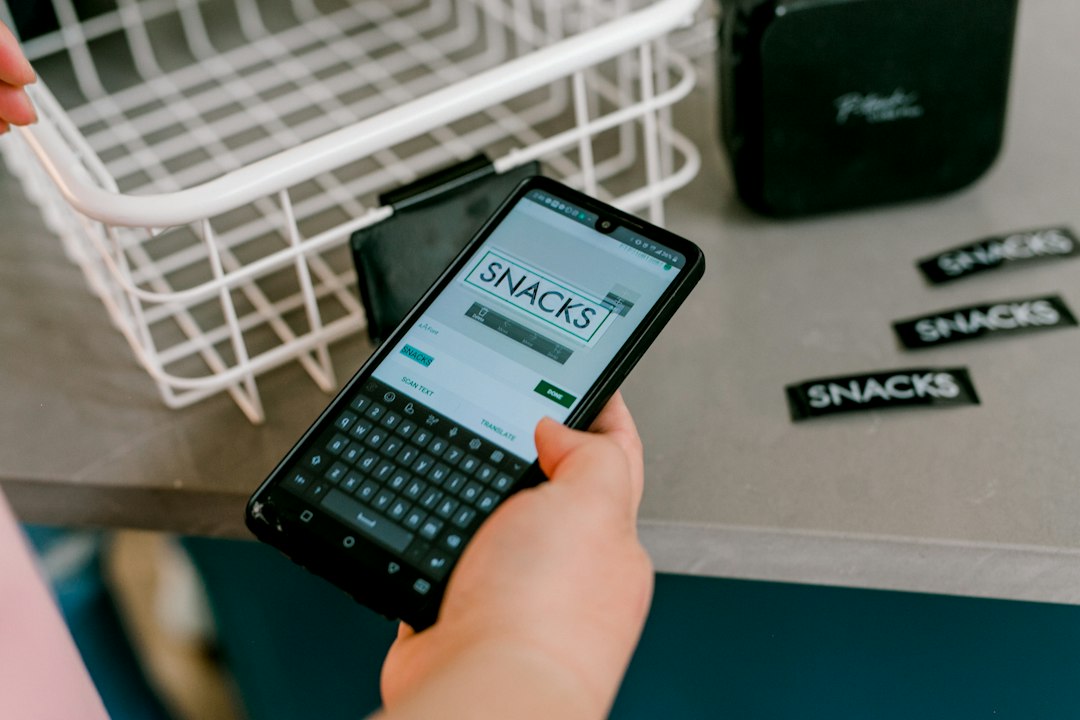
The label maker we would buy for a home desk is the DYMO LetraTag LT-100H at £26.99. It types on its own keyboard, prints without a phone and takes tape you can pick up in any stationery shop. We compared eight models sold in the UK, priced from £9.68 to £29.99, on tape width, how you type the text and what a refill costs once the roll in the box runs out. Two of them are the same machine wearing different badges, and one of those is the better buy of the pair.
🔑 Key Takeaways
- Our top pick: the DYMO LetraTag LT-100H at £26.99, because it needs no phone, no account and no app update before it will print.
- Best bundle: the SUPVAN E11 at £29.99 ships with four tapes and gives you a keyboard and Bluetooth in one body.
- Cheapest that works: the Rongta R5 at £9.68 if you are happy to print from a phone.
- Lowest running cost: the Phomemo E975 embosser at £14.38 uses no ink and no batteries.
📚 More small desk kit: our guides to desk organisers and cable management boxes.
Most UK roundups of this category stop at two brands and never mention what the tape costs after the first roll. That is the number that decides whether a label maker stays on the desk or ends up in a drawer, so it gets its own section below. We also flag the pair of embossers here that are the same hardware under two names, because paying more for one of them buys nothing.
Quick comparison
| Label maker | Price | Type | Best for |
|---|---|---|---|
| DYMO LetraTag LT-100H | £26.99 | Keyboard, no app | Most desks |
| SUPVAN E11 | £29.99 | Keyboard plus Bluetooth | Tape bundle |
| Brother PT-H110 | £29.99 | Keyboard, laminated tape | Cables and plugs |
| SUPVAN T50M Pro | £26.99 | Bluetooth, wide tape | Shelf edges |
| Nelko P21 | £14.99 | Bluetooth sticker printer | Phone-first users |
| Phomemo E975 | £14.38 | Embosser, no power | Lowest running cost |
| Memoking E975 | £15.97 | Embosser with 6 tapes | Best value embosser |
| Rongta R5 | £9.68 | Bluetooth, cheapest | Trying it out |
1. DYMO LetraTag LT-100H Handheld Label Maker, £26.99
The LT-100H is the unit we would hand to someone who wants labels today and does not want another app on their phone. The keyboard is an ABC layout rather than a QWERTY one, which sounds clumsy and turns out to be quick for short words like KETTLE or WIFI, because you are not hunting for letters in two places.
The screen shows 13 characters at once, so a two line label fits before you commit to printing. DYMO prints on LetraTag tape, which comes in paper, plastic and magnetic versions, and the plastic one is the sensible choice for a kitchen because it wipes clean.
The catch is the tape price. LetraTag cassettes cost more per label than the generic rolls used by the Bluetooth printers here, so if you plan to label two hundred things the cheaper machine plus cheap tape can win on total cost. For a normal desk with fifty labels a year, that gap is small enough to ignore.
Verdict: our top pick for a home desk, and the one we would recommend to anyone who does not want to print from a phone, at £26.99.
2. SUPVAN E11 Keyboard and Bluetooth Label Maker with 4 Tapes, £29.99
The E11 is the only model here that gives you both ways of working in one body. There is a keyboard on the front for quick jobs, and a Bluetooth link to the SUPVAN app for anything with a logo, a symbol or a long line of text, where the app keyboard beats thumb typing on a rubber pad.
Four tapes come in the box, which is the reason it costs a pound more than the DYMO and is still the better value of the two. It recharges over USB rather than eating batteries, and the printer is inkless, so there is nothing to replace except the tape itself.
The app is the weak point in the same way as every app printer: it wants an account, it wants updates and it will not work on a colleague's phone in a hurry. If you never intend to use the phone side, buy the DYMO and save a few pounds.
Verdict: the best bundle for someone who wants a keyboard and app printing in one machine, at £29.99.
3. Brother PT-H110 Label Printer, £29.99
Brother's P-touch machines are what most UK offices already own, and the PT-H110 is the small one in that family. The reason to pick it over the cheaper keyboards is the tape. Brother's laminated TZe cassettes put a clear plastic layer over the print, so a label on a plug or a folder spine still reads after a year of being handled.
The keyboard is a proper layout with shift and shift lock, there is a preview before printing, and the cutter is built into the body so you get a clean edge without scissors. It runs on disposable batteries, so keep a pack in the drawer rather than discovering it is flat mid job.
It is the slowest of the keyboards to set up a long label on, and the print is single colour. Neither matters for the job most people buy it for, which is labelling cables, folders and storage boxes.
Verdict: the pick for anything that has to survive daily handling, especially cable labelling, at £29.99.
4. SUPVAN T50M Pro Bluetooth Label Maker, £26.99
The T50M Pro is built around wide tape, and that changes what it is for. Standard 12 mm labels look lost on a shelf edge or a storage crate, while this prints a broad label you can read from across a room. The tape is waterproof, which makes it the one here that suits a garage shelf or a plant pot.
It is Bluetooth only, with no keyboard at all, so the phone is not optional. The app does the layout work and lets you save a template for repeat jobs, which is genuinely faster than retyping the same words on a rubber keyboard.
Wide tape costs more per metre than the narrow rolls, so this is not the machine for labelling fifty plugs. Buy it when the job is a dozen big labels that need to be read from a distance.
Verdict: the one we would pick for shelf edges, crates and anything read from standing height, at £26.99.
5. Nelko P21 Portable Bluetooth Sticker Printer, £14.99
The P21 is half printer, half phone accessory, and it is honest about that. There is no keyboard, the tape comes in a small cassette that clicks into the top, and everything happens in the Nelko app, including the templates for pantry jars and cable flags.
At £14.99 it is the cheapest way to get a proper printed label rather than a strip of masking tape, and the white body looks better on a desk than the black alternatives. The print is small, so it suits jar lids and folder tabs rather than crates.
The trade is dependency. When the app is updated and the layout moves, you spend ten minutes finding the print button again. If that sounds irritating, the DYMO above is the calmer choice for a few pounds more.
Verdict: the best cheap entry point if you already do everything else on your phone, at £14.99.
6. Phomemo E975 Embossing Label Maker, £14.38
The E975 is not a printer in the electronic sense at all. You dial each character on a wheel, squeeze the handle and the plastic tape comes out embossed with white letters. No batteries, no app, no ink, and nothing to charge, which is why it is the cheapest thing here to keep running.
It produces 9 mm embossed tape, the same tape that has been on filing cabinets since the 1970s. That look is either exactly what you want on a workshop shelf or completely wrong in a kitchen, and there is no middle ground.
The limits are real: one line of text, capital letters only, and a squeeze per character, so a long label is slow work. The adhesive also loses grip on textured plastic, which rules it out for some plug casings.
Verdict: the pick for anyone who wants labels with no power, no app and the lowest refill cost here, at £14.38.
7. Memoking E975 Embossing Label Maker with 6 Rolls of Tape, £15.97
This is the same E975 hardware as the Phomemo above, sold under a different name with six rolls of tape instead of the usual one or two. The embossing mechanism, the character wheel and the 9 mm tape are identical, so there is no quality argument between them.
Which one to buy comes down to simple arithmetic. Six rolls of embossed tape bought separately normally costs more than the £1.59 difference between these two listings, so the Memoking is the better buy unless you specifically want the Phomemo colourway.
The same caveats apply: capital letters only, one line at a time, and a squeeze per character. Treat it as a tool for storage boxes and workshop drawers rather than a desk printer.
Verdict: the better value of the two E975 embossers, purely because of the tape in the box, at £15.97.
8. Rongta R5 Mini Bluetooth Label Maker, £9.68
The R5 is the cheapest machine in this list and the one to buy if you are not yet sure you will use a label maker at all. It pairs with a phone, prints a single width of tape and does the job with no fuss once the app is installed.
Build quality is where the saving shows. The body is light plastic, the tape door needs a firm press to click shut, and the print head wants a clean every couple of rolls or the labels come out streaky. None of that stops it working.
It ships with one roll, and the refills are cheap, so the total cost over a first year is lower than anything else here. If you label a handful of boxes a month, this is enough machine.
Verdict: the cheapest sensible way to try labelling, at £9.68.
What the tape costs after the first roll
Every machine here is sold with one roll, and that roll runs out faster than people expect. A 12 mm cassette holds roughly four metres, which is about eighty short labels if you trim the margins, so a keen labeller gets through a cassette a month.
That is why the refill price matters more than the printer price. Generic Bluetooth printers take unbranded cassettes that cost very little, embossers take cheap plastic tape, and the branded keyboards take cassettes priced by the manufacturer. Before you order, price a three pack of tape for the model you are considering and multiply by how often you expect to print.
One practical tip: buy the multi pack rather than singles. The per cassette price drops noticeably and you stop rationing labels, which is the point of owning the machine.
Keyboard, app or embosser
Keyboard machines are for people who want the label now. There is nothing to pair, nothing to charge if you keep batteries in the drawer, and no account. They are slower for anything longer than a few words.
App machines win on layout. Templates, symbols, barcodes and saved designs are all easy on a phone screen, and the hardware is cheaper because the screen and keyboard live in the phone you already own. The cost is dependency on an app that may change.
Embossers are the odd one out and still worth considering for storage. They never run out of power, the tape is the cheapest per label, and the raised lettering survives a damp shed. They cannot do lower case, symbols or multi line labels.
Three things to check before you order
Tape width and availability. A machine that only takes the maker's own cassette is fine until the model is discontinued. Check that tape for your shortlist is in stock in at least two shops.
Where the label has to stick. Flat and smooth is easy. Curved cable, textured plastic and anything that lives outdoors all need either laminated tape or a wrapped flag label, and the embossers are the weakest here.
How you will store the machine. The keyboards are about the size of a TV remote and live happily in a drawer. The app printers are smaller but need charging, so they want a USB cable nearby, which is worth thinking about if your desk is already crowded with keyboard tray and cable kit.
Frequently asked questions
Are label makers worth it for a home office?
They earn their place when the same thing gets asked twice, such as which cable runs to the monitor or which box holds the receipts. A label maker costs less than a takeaway and turns a blank box into something you can find in a hurry. If your storage is already labelled with a marker pen, buying a machine will not change much.
Do I need an app to use a label maker?
Not with the keyboard units here. The DYMO LetraTag, the SUPVAN E11 and the Brother PT-H110 all type directly on the device, so they work with no phone and no account. The cheaper Bluetooth models at this price print only from an app, which is fine at a desk and awkward in a kitchen drawer with no signal.
What tape width should I buy?
Twelve millimetre tape is the sensible default because it fits on a plug, a folder spine and a jar lid without wrapping round itself. Nine millimetre embossed tape is narrower and better on cable and small parts. Anything wider than 18 mm is for signage and shelf edges rather than home storage.
Can these label makers print on heat shrink tubing for cables?
No. Heat shrink printing needs a dedicated tube cassette and a printer built to clamp it, which none of the eight models here support. For cables, use a normal adhesive label wrapped round the cable with half an inch of overlap, or print a label for the plug end instead.
Why do embossed labels peel off some surfaces?
Embossed plastic tape is stiff and only has pressure sensitive adhesive on the back, so it grips flat, smooth plastic well and textured or dusty surfaces badly. Wipe the surface, press the label down for a few seconds and keep embossed labels off anything that flexes, such as a charging cable.
Are the labels waterproof?
The laminated tape used by the Brother and SUPVAN machines copes with a wipe and a damp cloth, which is what a kitchen jar or a bathroom bottle needs. Embossed tape is plastic and survives water, but the adhesive behind it gives up first on a wet surface, so label dry items rather than things that live in the sink.
Our verdict
Buy the DYMO LetraTag LT-100H at £26.99 if you want one answer. It prints without a phone, the tape is everywhere, and it will still be working in five years.
Spend differently only for a reason: the SUPVAN E11 at £29.99 if you want app templates as well as a keyboard, the Brother PT-H110 at £29.99 if the labels are going on cables and plugs that get handled, the SUPVAN T50M Pro at £26.99 for wide labels on crates, or the Phomemo E975 embosser at £14.38 if you never want to charge anything.
For more small kit that fixes a desk, see our guides to desk organisers, cable management boxes and monitor risers, or browse the latest home office reviews.